About this example
- About this example
- Code walkthrough
During the previous exercise, you executed a Workflow that included two Activities, both of which made a call to a microservice that provided a customized message in Spanish. That exercise demonstrates many of the key concepts you've learned during this course. Although you now have first-hand experience with developing and running applications on the Temporal Platform, you'll gain a deeper understanding of how Temporal works by looking at what happens during Workflow Execution.
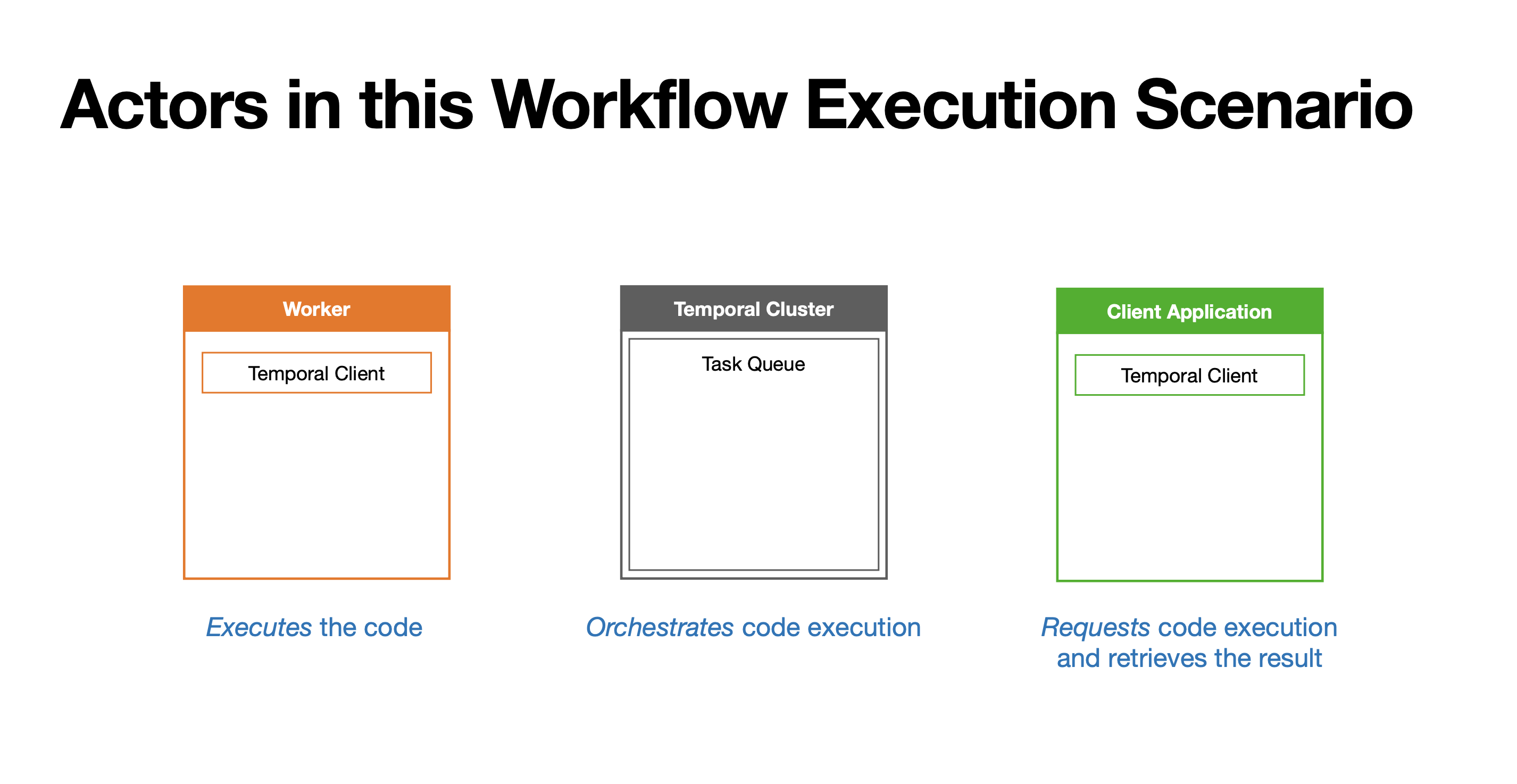
The actors in the scenario
Let's begin by identifying the actors in this scenario, which will help to reiterate some important concepts.
First, the example includes a Worker, which executes the Workflow and Activity code, and uses a Client to communicate with the Cluster.
Next, the Temporal Cluster orchestrates the execution of that code by coordinating with the Worker, using a shared task queue.
Finally, the program that starts the Workflow, which will be referred to as a Client application because it requests Workflow Execution as well as the result from the Temporal Cluster, uses a Client to do this.
How work is assigned
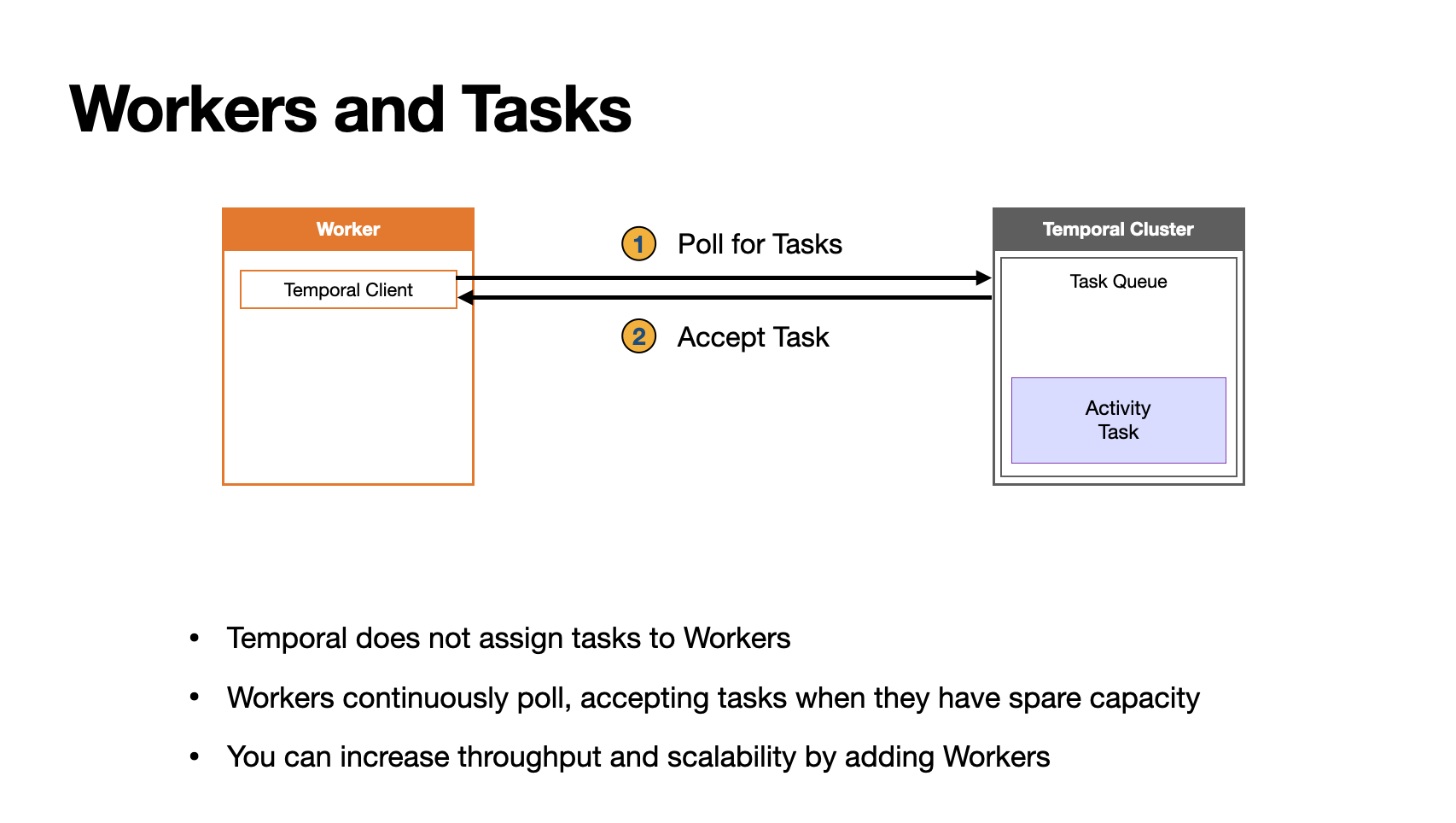
The assignment of work is indirect. The Temporal Cluster does not assign tasks to a Worker (in fact, the Temporal Cluster does not maintain a list of Workers).
Instead, the Workers continually poll the Temporal Cluster's Task Queue when they have open slots to process tasks. There are several benefits to this approach, but one of them is that tasks will just sit in the queue if there aren't enough Workers, which means that you can increase throughput and scalability by adding more Workers.
As you learned earlier, Temporal applications in production will typically have multiple Workers; however, this example uses a single Worker for the sake of simplicity.
The role of Commands
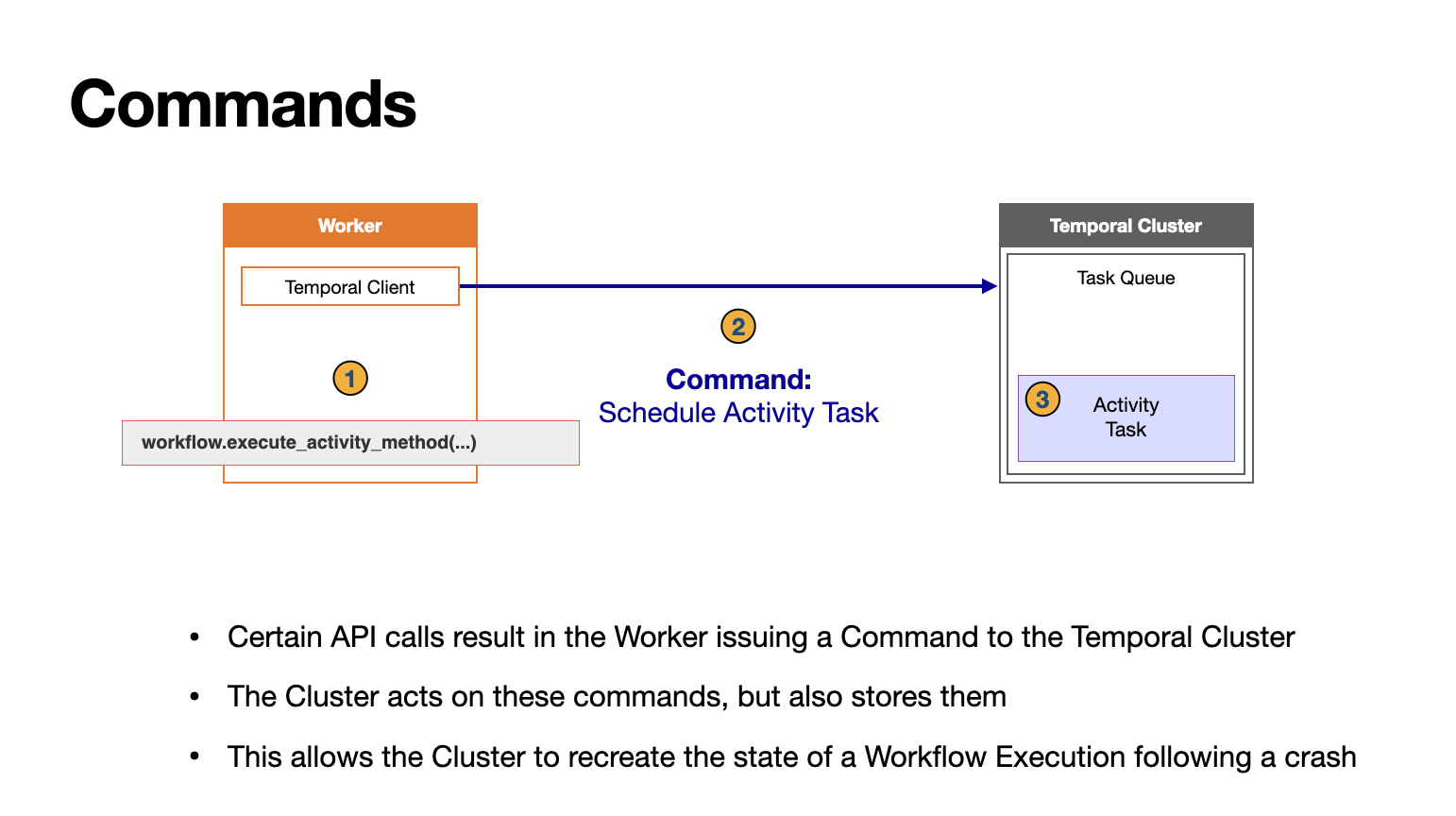
Another thing that will help you understand Temporal is the role of Commands. When the Worker encounters certain API calls during a Workflow Execution, such as a call to the Workflow's execute_activity_method function, it sends a Command to the Temporal Cluster. The Cluster acts on these Commands, for example, by creating an Activity Task, but also stores them in case of failure.
For example, if the Worker crashes, the Temporal Service works with the remaining Workers to recreate the state of the Workflow to what it was immediately before the crash, and they resume progress from that point. This allows you, as a developer, to code as if this type of failure wasn't even a possibility.
The Activity Definitions
The application defines two Activities: greet_in_spanish and farewell_in_spanish.
import urllib.parse
from temporalio import activity

class TranslateActivities:
    def __init__(self, session):
        self.session = session

    @activity.defn
    async def greet_in_spanish(self, name: str) -> str:
        greeting = await self.call_service("get-spanish-greeting", name)
        return greeting

    @activity.defn
    async def farewell_in_spanish(self, name: str) -> str:
        farewell = await self.call_service("get-spanish-farewell", name)
        return farewell

    # Utility method for making calls to the microservices
    async def call_service(self, stem: str, name: str) -> str:
        base = f"http://localhost:9999/{stem}"
        url = f"{base}?name={urllib.parse.quote(name)}"

        async with self.session.get(url) as response:
            response.raise_for_status()
            return await response.text()
The Workflow Definition
The Workflow Definition executes those two Activities and returns a string created from their output.
from datetime import timedelta
from temporalio import workflow

# Import activity, passing it through the sandbox without reloading the module
with workflow.unsafe.imports_passed_through():
    from translate import TranslateActivities


@workflow.defn
class GreetSomeone:
    @workflow.run
    async def run(self, name: str) -> str:
        greeting = await workflow.execute_activity_method(
            TranslateActivities.greet_in_spanish,
            name,
            start_to_close_timeout=timedelta(seconds=5),
        )

        farewell = await workflow.execute_activity_method(
            TranslateActivities.greet_in_spanish,
            name,
            start_to_close_timeout=timedelta(seconds=5),
        )

        return f"{greeting}\n{farewell}"
The Worker initialization code
Here's the Worker initialization code, which registers the Workflow and Activity Definitions.
import asyncio
import aiohttp

from temporalio.client import Client
from temporalio.worker import Worker

from translate import TranslateActivities
from greeting import GreetSomeone


async def main():
    client = await Client.connect("localhost:7233", namespace="default")

    # Run the worker
    async with aiohttp.ClientSession() as session:
        activities = TranslateActivities(session)

        worker = Worker(
            client,
            task_queue="greeting-tasks",
            workflows=[GreetSomeone],
            activities=[activities.greet_in_spanish, activities.farewell_in_spanish],
        )
        print("Starting the worker....")
        await worker.run()


if __name__ == "__main__":
    asyncio.run(main())
Summary
In this course, you saw how the parts of a Temporal Application - a Worker, the Temporal Cluster and the Client Application - work together during a Workflow Execution.
In the next video, you will see how all the parts work together via a code walkthrough.
Get notified when we launch new educational content
New courses, tutorials, and learning resources - straight to your inbox.